
All-in-one business workflow, website, and AI receptionist for soil, septic, environmental, and land-service professionals
Less Paperwork. Get Paid Faster.
Keep your projects organized and your clients informed, from first request to final payment.
- Business workflowKeep requests, documents, schedules, and payments connected.
- Client-facing websiteLet clients request services and pay online.
- Field appCapture site notes, photos, and field forms from iPhone or Android.
- AI receptionistAnswers calls, captures leads, and shares availability and project updates.
Clients pay online. Reports unlock instantly.
Free 14-day trial · No credit card required
5.0 on GoogleRead them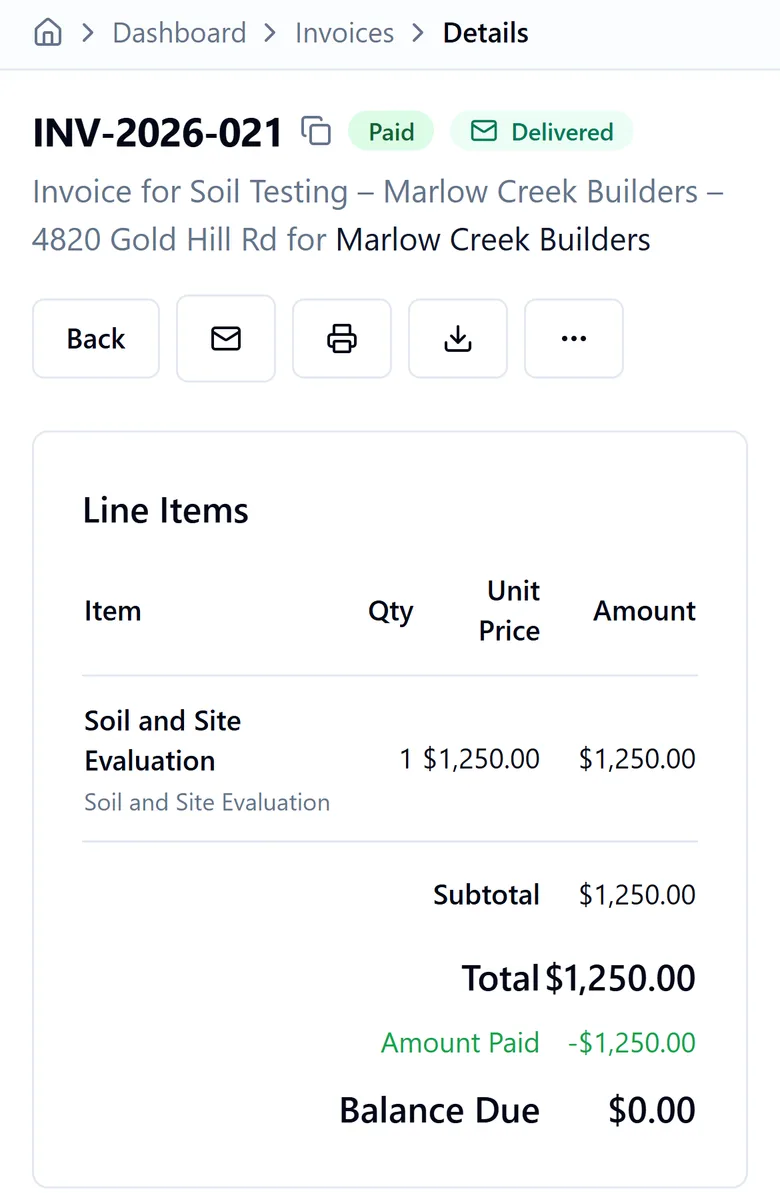
Sound Familiar?
Whether you evaluate soil, install septic systems, inspect for mold, or survey land, the office side looks the same.
Can't Find It When a Client Asks
A client calls about a project from last year, or something they agreed to in an email. Now you're digging through inboxes and folders while they wait.
Juggling Too Many Tools
Proposals in one app, contracts in another, invoices in a spreadsheet, and site photos on your phone. Nothing is connected, so you type the same client details again at every step.
Revenue Leaking Through the Cracks
Invoices go out late or get forgotten. The work is delivered before the client pays, and chasing payment eats the time you should spend in the field.
Phone Rings, Nobody Answers
You can’t pick up from a crawl space, a trench, or a property line. Callers hang up and try the next company on the list, and the project goes with them.
There's a better way.
From Request to Report — Four Simple Steps
See how ServGround handles a project, from the first call to the paid invoice
Step 1
Receive Requests
- Centralized intake (voice + web + portal)
- AI receptionist captures details 24/7
- Parcel and property data captured upfront
- Automated follow-ups on incomplete requests
Step 2
Propose & Sign
- Quick Send: proposal or contract in one click
- Auto-invoice on acceptance — deposit + balance computed automatically
- E-sign contracts directly in the client portal
- Automated reminders before expiration
Step 3
Invoice & Collect
- Installment plans and milestone billing
- Shareable payment links — anyone can pay, no login required
- Email delivery tracking — know when clients receive invoices
- Automated escalating reminders + QuickBooks sync
Step 4
Deliver Reports
- Payment-gated report delivery
- Auto-unlock on payment
- In-app messaging — discuss findings without leaving the platform
- Override access for trusted clients
The Old Way vs. The ServGround Way
Without ServGround
- 1.Client submits a request on your website
- 2.You spot it buried in a crowded email inbox
- 3.Email back and forth for the parcel number, mailing address, and missing details
- 4.Client asks for a quote — you write one up and send it
- 5.Client accepts the quote
- 6.Dig through old emails and copy the client’s details into a tracking spreadsheet
- 7.Switch to a separate tool to build and send the proposal, then log it in the spreadsheet
- 8.Client accepts — update the spreadsheet again
- 9.Send the invoice from yet another tool
- 10.Drive out and do the field work — still unpaid
- 11.Come back and write up the report — still unpaid
- 12.Email the client a reminder to pay
- 13.Client pays — log into your payment system to confirm, then update the spreadsheet
- 14.Email or mail the report
- 15.It never arrives — the mailing address was never validated
- 16.Track down the correct address, resend, and wait for confirmation
16 steps · 4 tools · days of follow-up
With ServGround
- 1.Client submits the request — it flows straight into your dashboard
- 2.Reply in-thread and capture the parcel #, address, and details in one place
- 3.Quick Send a proposal from the request in one click
- 4.Client accepts — a deposit invoice is auto-created and sent
- 5.Do the field work; publish the report — payment-gated in the client portal
- 6.Client pays, the report unlocks automatically, and delivery is tracked — no bounced mail
6 steps · 1 platform · automated end to end
See How It Works
A short recording of the app: a request coming in, a proposal going out, an invoice getting paid, and a report being delivered.
ServGround Quick 2 min Overview
A short narrated tour of the main screens in ServGround.
The full video library comes with your free trial.
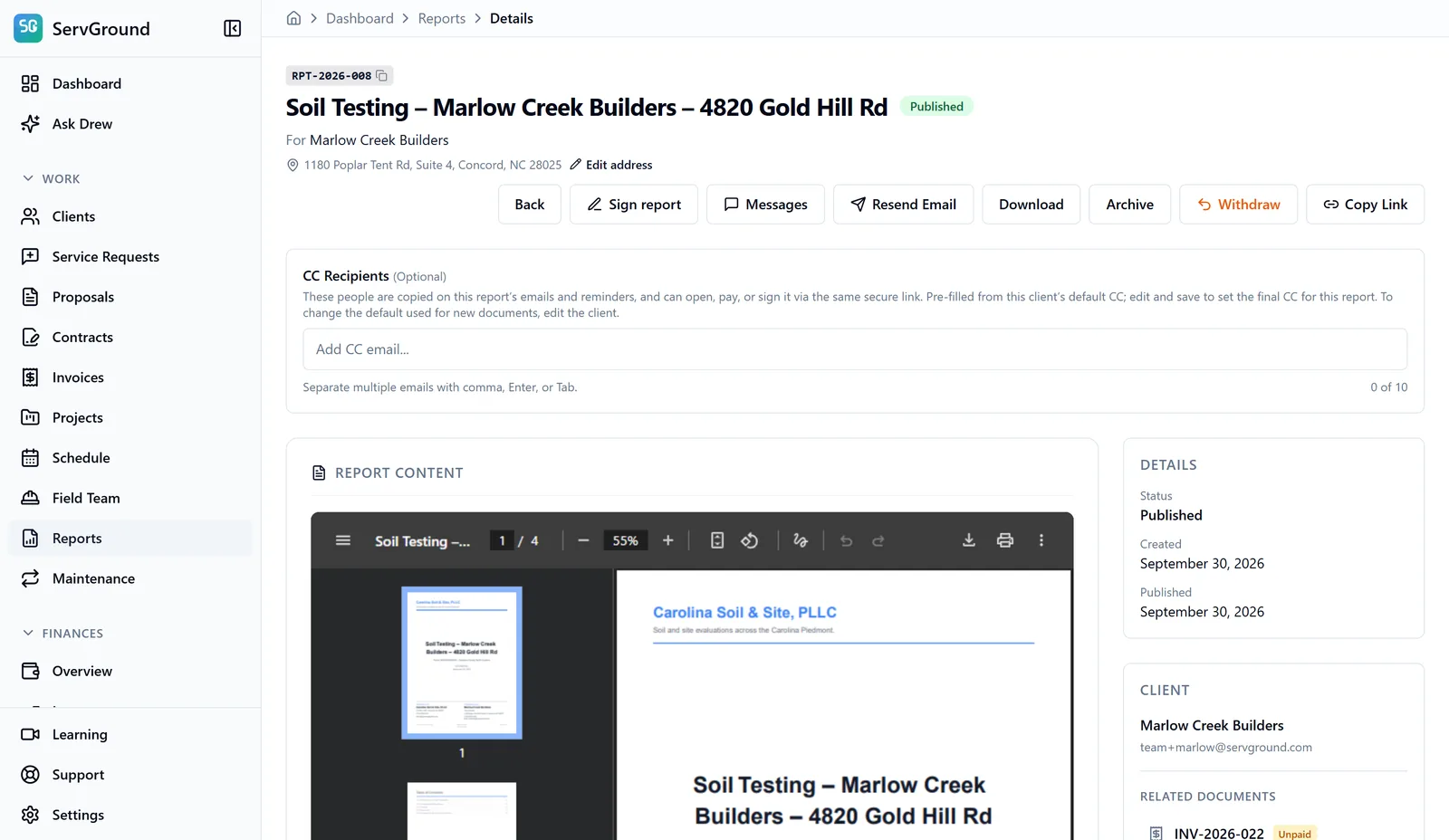
What it looks like in the app
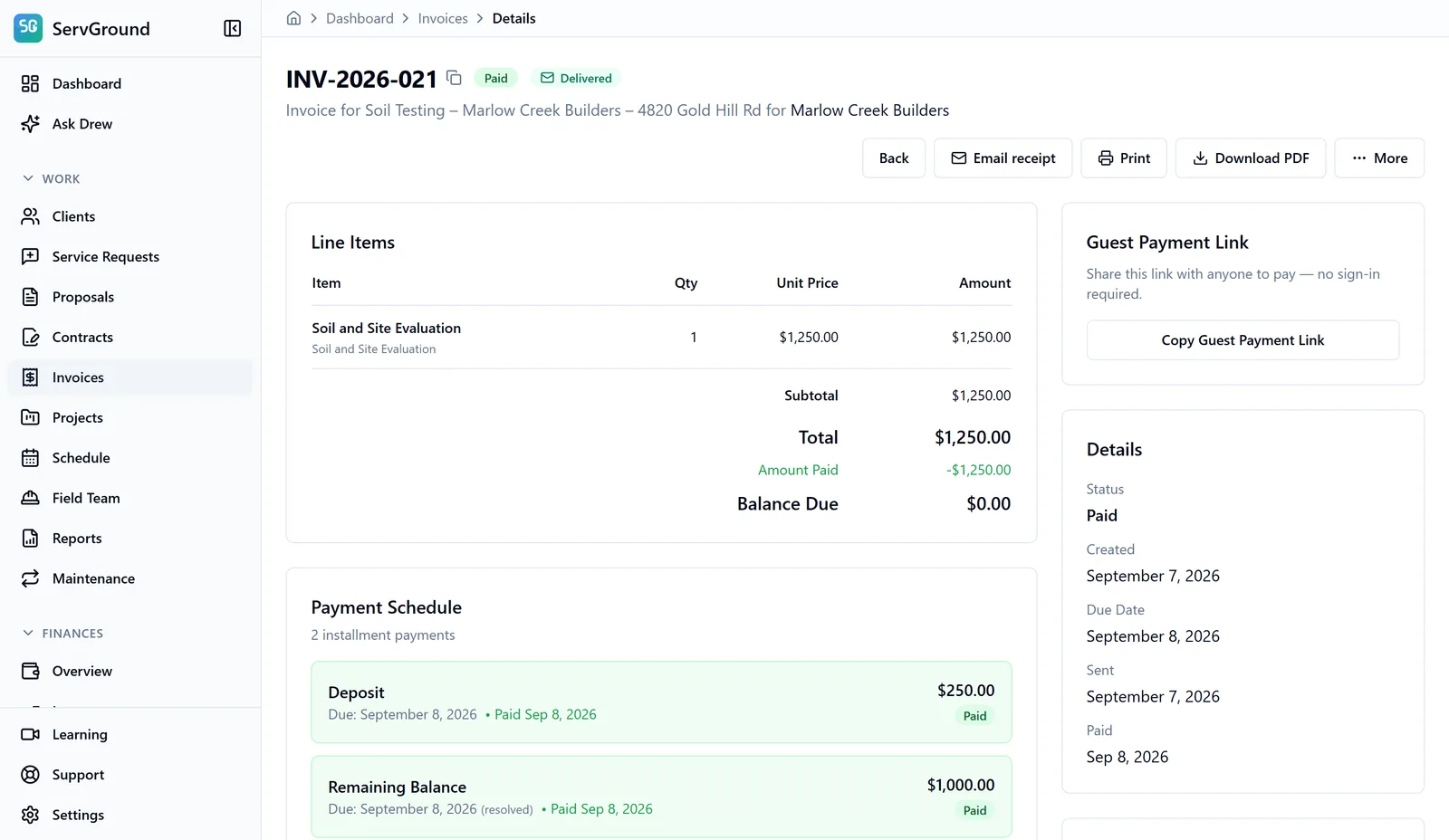
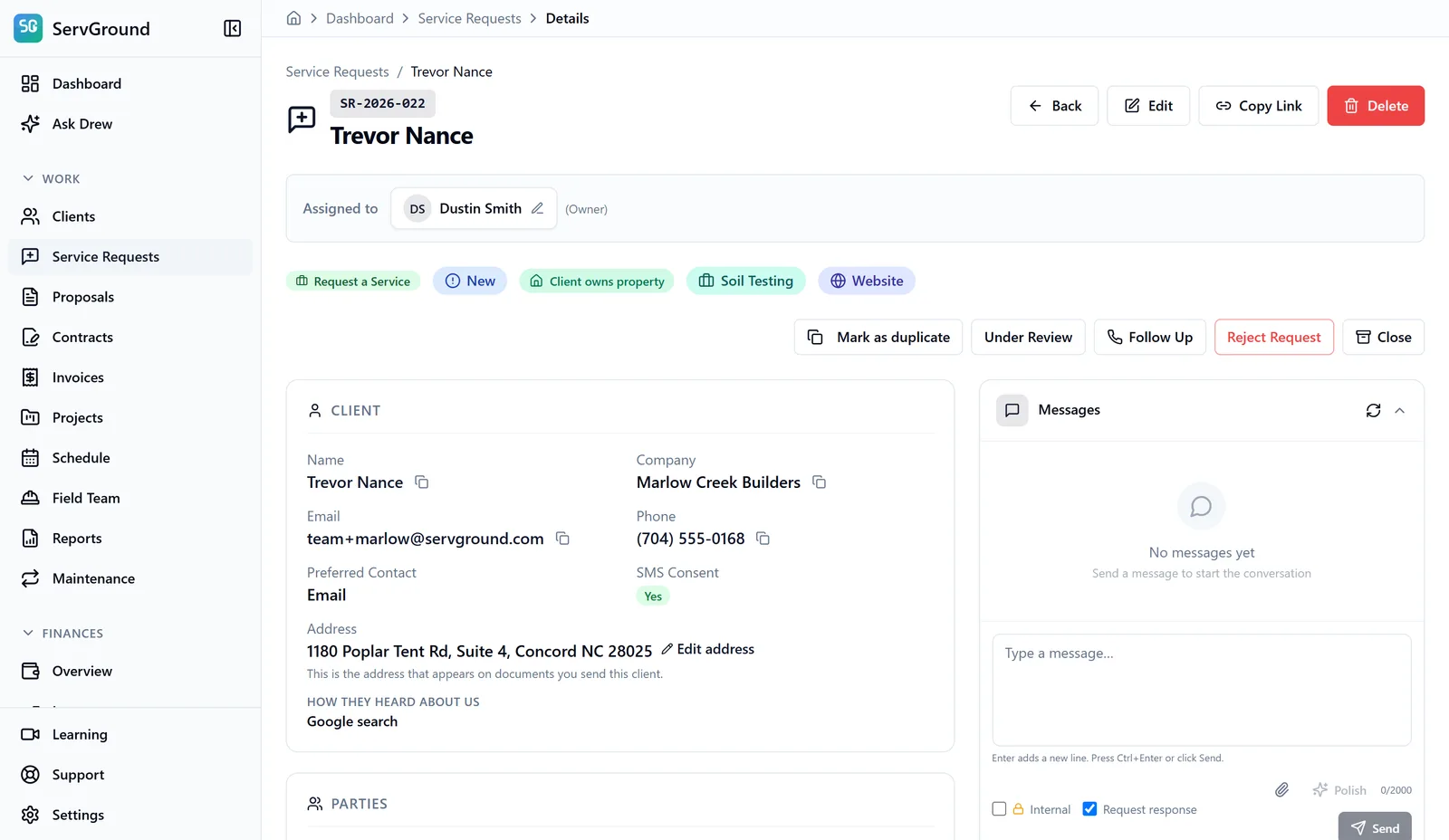
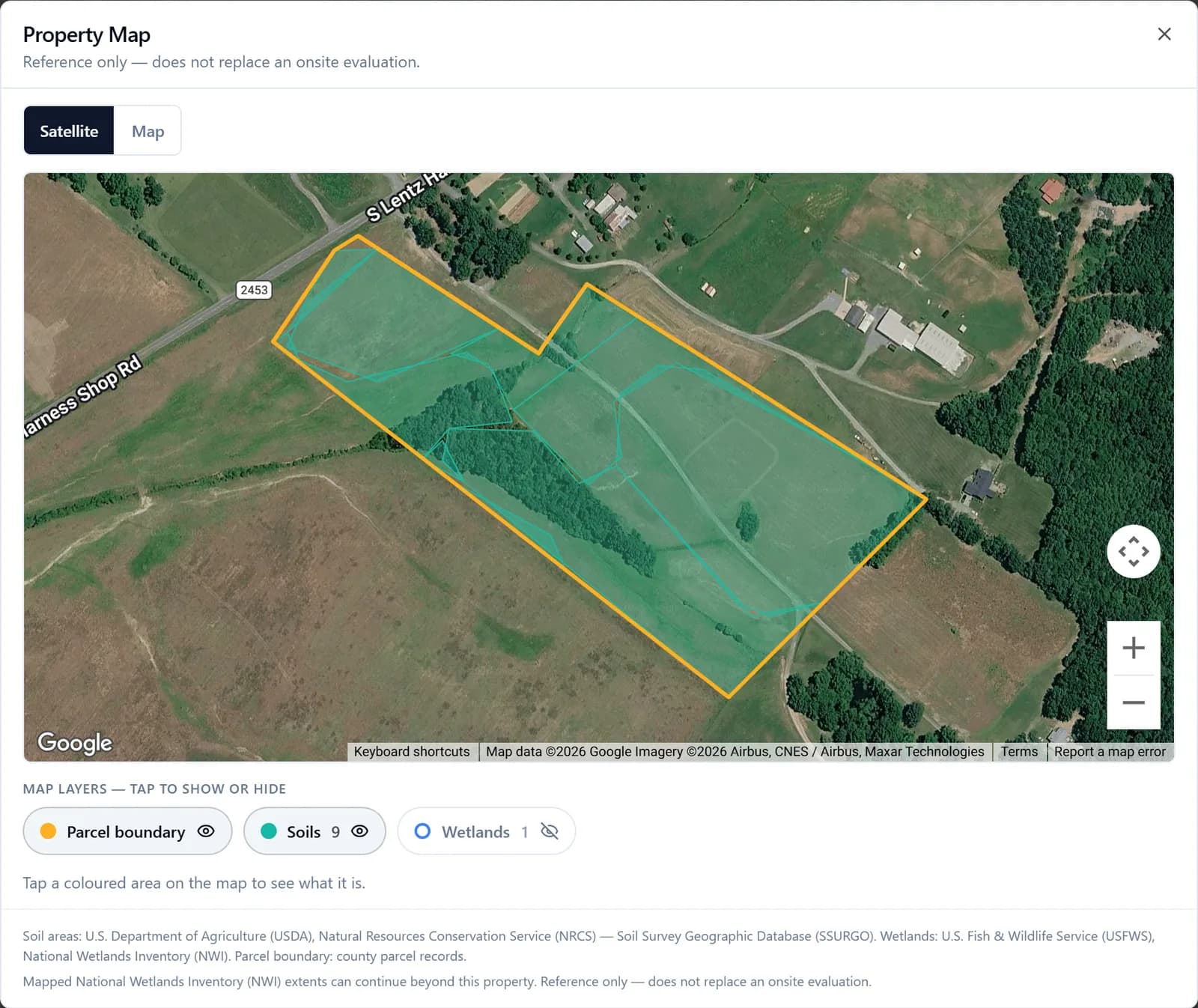
These are real screens from a demo account. One soil testing project, from the request to the paid invoice and the published report.
ServGround Field
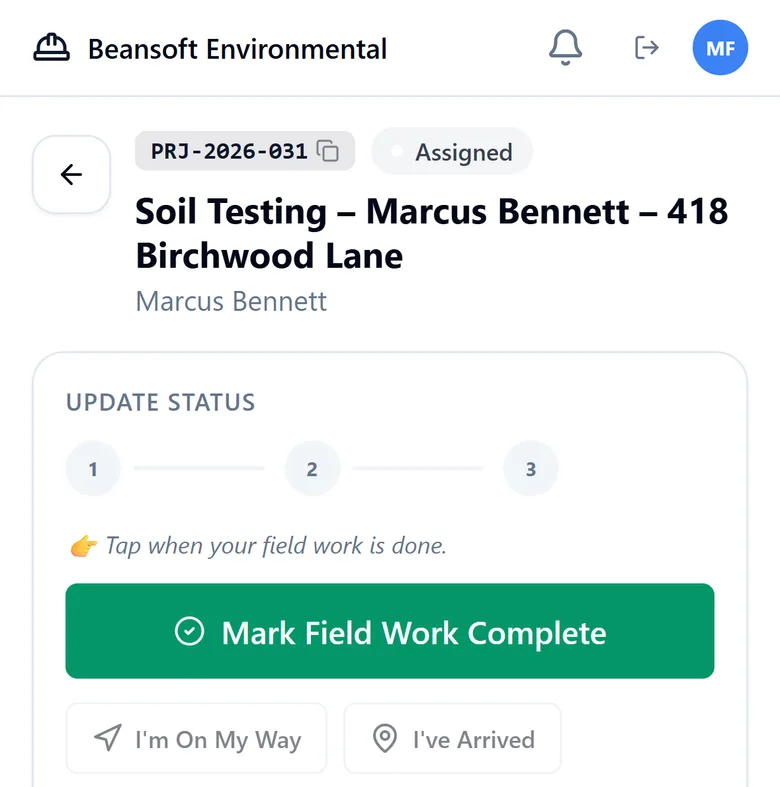
An app for the crew on site
Technicians use ServGround Field on their phones. Everything they do shows up in the office right away.
- See the day’s projects with the address and site directions
- Tap On My Way, Arrived, and Field Work Complete so the office knows where things stand
- Take photos on site and send messages to the office
Field worksheets (optional)
For firms that file state forms, the technician fills the form at the site and the office turns it into a PDF for the licensed professional to review and sign.
- Soil and site evaluations, including the North Carolina and South Carolina state forms
- Septic system inspections and septic operator report cards
AI That Works While You’re in the Field
All three answer from what is in your account: your services, your schedule, and your records.
Never miss a new inquiry
AI Voice Receptionist
Your AI receptionist picks up while you are on a site visit, takes down the details of each new request, and answers common questions from the services and availability you set up.
- Answers calls during field visits
- Captures complete service request details
- Tells callers when you are next available
- Sends text follow-ups automatically
Ask about your own business
Drew, Your Business Assistant
Drew works inside your ServGround account. Ask who still owes you, what is on the schedule this week, or how to do something in ServGround, and get the answer from your own records.
- Tells you who owes you and how much
- Shows what is scheduled and who is on it
- Walks you through any feature step by step
- Included on every plan
Answers questions about your services 24/7
AI Website Agent
Your website agent answers questions about your services and availability at any hour, even 2am on a Sunday, using the knowledge base you set up.
- Instant answers from your knowledge base
- Answers availability and scheduling questions
- Hands off to contact form when needed
- Learns from your documents and website
Trusted by Environmental & Site Consultants
Hear from firms that simplified their operations with ServGround.
5.0 on GoogleLarry Thompson, PWS, LSS, AOWE
President, Thompson Environmental Consulting, Inc.
“ServGround has quickly become one of the most valuable tools in my workflow. In an industry where clear communication, accurate billing, and dependable customer management are absolutely critical, this platform delivers exactly what service professionals need. What stands out most is how intuitive and customer-focused the system is. Creating estimates, sending invoices, and tracking payments is straightforward, and the platform keeps everything organized in a way that saves me time and reduces errors. My clients appreciate the clean, professional look of the documents they receive, and I appreciate how easy it is to manage each project from start to finish. The team behind ServGround clearly understands the realities of field-based work. The platform feels like it was built for contractors and consultants, not adapted from a generic billing system. Support is responsive, updates are meaningful, and the overall experience has been consistently reliable. If you're looking for a billing and customer management platform that actually supports the way our industry works, ServGround is an excellent choice. It has streamlined my operations, improved client communication, and added a level of professionalism that sets my business apart.”
John Roberts, LSS
Owner, Ground Truth Soil Consulting
“ServGround has been incredibly helpful from start to finish. Their team is responsive, knowledgeable, and genuinely committed to solving problems the right way. Every interaction feels professional and straightforward, and they go out of their way to make sure you understand what's happening at each step. It's rare to find a service that combines expertise with this level of friendliness and reliability.”
Dr. Erik Severson, LSS
Owner, Severson Soil Consulting, PLLC
“Look no further—ServGround is an absolute game-changer. After weeks of searching for the right billing and scheduling software, I was astounded to find that someone had already built exactly what I needed. The system seamlessly covers nearly every scenario a business in our industry faces. ServGround offers an unparalleled service that feels tailor-made precisely for professionals in the environmental consulting and soil science fields. It brings billing, invoicing, payments, and record-keeping together into a smooth, highly intuitive, and user-friendly platform. It even includes smart features like address validation, which significantly reduces errors. Beyond the software itself, the customer support is incredibly responsive and helpful; the team will walk you step-by-step through setting up your client-facing business interface to get you up and running quickly. By keeping our tasks organized and automatedly tracking payments, ServGround allows us to focus entirely on our actual work. This company is a true hidden gem that every environmental consultant should know about!”
Miranda Stamper, LSS, AOWE
President, Stemper Soil Services
“We had a great demo of ServGround and it is going to be invaluable tool for our company. It incorporates all the challenges of the business in one application. Thankful for the support.”
Alan Clapp, LSS, AOWE
Owner, Alan Clapp LSS
“David is great to work with. Provided great feedback and helped me through building the website.”
These reviews are on our Google Business profile.
Start Your Free TrialSimple, Transparent Pricing
Choose the plan that fits your business. All plans include a 14-day free trial.
Starter
billed annually at $490
Save $98 — 2 months free!
The essentials to get your business running.
- Includes:
- Professional website + client CRM
- Unlimited clients & contacts
- Proposals, contracts & e-signatures
- Invoicing & online payments
- Issue refunds to clients in-app
- Recurring & membership billing
- Recurring jobs & visits
- Automated reminders & follow-ups
- Two-way in-app client messaging on requests, invoices & reports
- AI website chat (300/mo)
- QuickBooks Online + Calendar sync
- Business, Field & Client mobile apps — install on any device
- Drew, your AI business assistant — ask what’s owed, what’s on the schedule, or how to do anything in ServGround
- Soil & site evaluation forms — NC 18E, SC D-1774 & any state — filled in the Field app, sealed and signed
- Inspection forms — NC Private Compliance Inspector (PCI) report, On-site Wastewater System Inspection Report & Septic System Report Card
- 1 team member
- 10 GB storage
Professional
billed annually at $990
Save $198 — 2 months free!
Save time with smarter automation.
- Everything in Starter, plus:
- AI receptionist — answers & texts callers 24/7
- Text clients by SMS on documents & messages
- AI receipt scanning
- Custom domain
- CSV export — bulk download your data
- Team timesheets — hours & overtime, payroll-ready export
- 5 team members
- 50 GB storage
- 750 AI website chats/mo
- 120 AI receptionist minutes/mo
- 75 SMS/mo
Out in the field all day? hands callers to your phone and sends quotes in one click.
Start Free TrialBusiness
billed annually at $1,990
Save $398 — 2 months free!
More automation. More control. Less admin.
- Everything in Professional, plus:
- Live call transfer — your AI receptionist connects callers to your team on request
- Connect your AI tools (ChatGPT, Claude) — read-only
- 1-click Quick Send (proposals, contracts, invoices)
- Custom client reminder schedules — choose the days, or turn reminders off
- Septic permit packages, ready to file — seals and e-signatures built in (NC)
- Works with your GIS — import parcel and pit locations from Google Earth, Avenza, QGIS or ArcGIS, with an aerial site map
- Priority support (24-hour response)
- 10 team members
- 250 GB storage
- 2,000 AI website chats/mo
- 240 AI receptionist minutes/mo
- 150 SMS/mo
Premier
billed annually at $2,990
Save $598 — 2 months free!
More capacity for your growing business.
- Everything in Business, plus:
- QuickBooks Desktop sync
- 25 team members
- 1 TB storage
- 7,500 AI website chats/mo
- 480 AI receptionist minutes/mo
- 400 SMS/mo
- Fast-track same-day support
Need more than 25 seats or several locations?
Start Free TrialProfessional or Business?
Business gives you twice the AI receptionist minutes and texts, plus time-saving tools:
Choose Business if…
- you miss calls while you’re on a site visit
- you send quotes or invoices most days
- you want to choose when clients get payment reminders
- you want answers from support within a day
Quiet month to month? Professional covers it.
Not sure which plan fits your business?
14-day free trial. No credit card required. Save 2 months with annual billing.
Start for FreeFrequently Asked Questions
Everything you need to know about running your service business with ServGround.